Apollo – Sticky Full Width HTML5 Audio Player
Apollo Sticky Full Width Audio Player Overview & Site-Wide Playback Engine
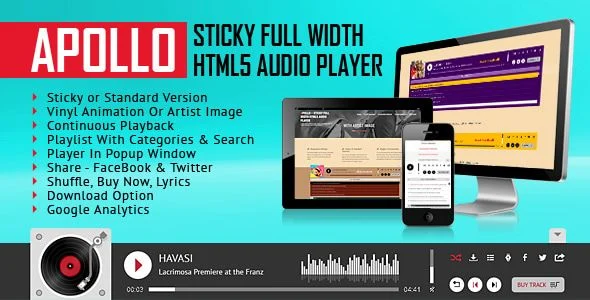
Apollo Sticky Full Width Audio Player is a JavaScript, HTML, CSS, and PHP media component, engineered for web developers and agencies that need persistent audio playback across static or CMS-driven websites. It resolves the fragmented listening experience caused by page-to-page navigation by pinning a full-width playback bar to the viewport, so an .mp3 or .ogg stream keeps running while visitors browse menus and content. In production workflows the package operates either as a sticky element spanning the entire site, as a standard in-content embed, or as a detached popup window, with a layered PSD included for visual asset editing.
Technical Specifications & Deployment Matrix
| Engineering Metric | Deployment Specification |
|---|---|
| Base Technology / Framework | HTML5 audio element driven by a JavaScript runtime (jQuery 3.5+ compatible, “use strict” mode enabled) |
| Runtime / Language Requirements | PHP-capable web server for folder-scanning and generation logic; client support spans IE9–IE11, Edge, Chrome, Firefox, Safari, and Opera, including iOS and Android devices |
| Data Exchange / Communication Protocols | Direct .mp3 and .ogg file loading, ID3v2 tag parsing for track metadata, and cookies for playback-state synchronization across page loads |
| Front-End / Engine Dependencies | Single JavaScript file of approximately 50KB; event binding migrated to the .on() delegation pattern |
| Database / Persistence Footprint | No database required; state persisted through cookies, with optional Google Analytics event tracking for per-file play counts |
Sticky Playback Pipeline & Playlist Execution Flow
The core mechanism is a cookie-synchronized sticky bar that preserves the audio element state between page loads.
On initialization, the script relocates the HTML5 audio tag inside its own controlled scope, insulating playback from libraries such as MediaElement that would otherwise rewrite the native element. When a visitor navigates, cookie records restore the current track position, enabling continuous playback without a full single-page-application rewrite. The playlist itself can be authored manually in markup or generated server-side: a PHP read-folder routine scans a directory of MP3 files and produces the playlist code automatically, pulling titles and authors from ID3v2 tags where present. Tracks can be grouped into categories, and a single audio file is permitted to belong to multiple category branches simultaneously. A live search field filters the list on title and author fields as the query is typed, and a toggle button collapses or expands the playlist panel, which can also be configured to render open on load.
For agencies delivering sticky viewport widgets in other media formats, Sticky Video – Addon For Elementor applies the same persistent-viewport pattern to video content inside the Elementor page builder, offering a parallel UI mechanism on a different runtime.
Core Technical Capabilities of Apollo Sticky Full Width Audio Player
- Popup window detachment: a dedicated button spawns the engine in a separate browser window, letting users browse the main site menu while the audio stream continues unbroken in the detached context.
- Dual visual modes with parametric theming: the rendering layer switches between an animated vinyl record and a static artist image, while two base skins (black and white) plus color parameters allow the interface to match any existing design system without stylesheet surgery.
- JavaScript API surface: exposed functions include changeMp3, which loads and auto-plays a new song from a page-level button, and a category-switch routine that re-filters the playlist from external page controls.
- Commerce and engagement hooks: per-song buy links, lyrics links, desktop-only download buttons, Facebook and Twitter sharing, and a favorites selector added in version 3.5 let teams wire the player into monetization flows.
- Multi-instance architecture: several independent player instances can coexist on one page or across a domain, each maintaining its own configuration parameters for autoplay, loop, shuffle, rewind, and volume.
Production Implementation & Operational Resilience
Deployment involves copying the JavaScript, CSS, and PHP files, defining parameters in the page markup, and pointing the playlist at .mp3 or .ogg sources. Version 3.1 added a parameter to boot the player in a minimized state, useful when the bar would otherwise compete with above-the-fold content. Because multiple instances share one document, each keeps isolated state, and the module runs under strict-mode JavaScript with event delegation through .on(), which reduces handler leakage on dynamic DOMs.
Operational boundaries are imposed by platform vendors rather than the codebase. On iOS and Android, autoplay is disabled at the operating-system level and cannot be reactivated from JavaScript, and on-device volume controls do not respond to script-driven adjustments, so listeners must use their physical hardware buttons. Safari 11 and Chrome 66 introduced equivalent desktop autoplay restrictions; the release log records targeted fixes in version 1.7 that handle those browser policies. The package also writes cookies for playback continuity and favorites, so any deployment should pair it with a cookie-consent notice to satisfy regional privacy rules. Optional Google Analytics integration reports how many times each audio file was played, giving teams measurable playback telemetry without additional instrumentation. For teams evaluating a WordPress-native standalone alternative on a different stack, MP3 Sticky Player WordPress & WooCommerce Plugin provides comparable sticky audio behavior, including MP3, SoundCloud, and Shoutcast sources, as an independent plugin path outside this codebase.
Frequently Asked Questions
Does autoplay function on iOS, Android, Safari 11+, and Chrome 66+?
No. Apple and Google disable autoplay for HTML5 audio at the platform level, and the restriction cannot be bypassed through JavaScript. Mobile listeners must initiate playback manually, and desktop Safari and Chrome apply the same policy after their respective versions.
Can the playlist be generated automatically from a server folder?
Yes. The PHP read-folder option scans a directory containing MP3 files and produces the playlist code from it, with improvements shipped in versions 3.4.0 and 3.6.1.0. This removes the need to hand-author each track entry in the page markup.
Is the download button available on mobile devices?
No. The download control operates on desktop environments only, as documented by the vendor. The button can also be hidden entirely through a parameter when a deployment should not expose file downloads to any visitor segment.
Can the player start minimized and still remain sticky site-wide?
Yes. Version 3.1 introduced a parameter that boots the player in a minimized state, and a separate fix in version 3.6 resolved a favorites-option conflict that appeared when sticky mode was active across a full website deployment.