AniFlix – Watch Anime Flix Streaming – Movies – TV Series Android Full App
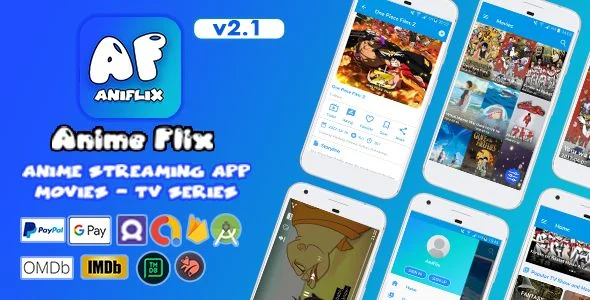
AniFlix Overview & Native Streaming Foundation
AniFlix is a native Android anime streaming application written in Java with Android Studio and synchronized through Firebase Realtime Database, engineered for mobile developers and studios to launch movie and TV series viewing platforms. The package eliminates the engineering cost of wiring a complete video-on-demand client—catalog browsing, multi-source playback, subtitle handling, and back-office content management—by shipping both the mobile project and a Node.js administrative console in one codebase. Within production delivery workflows, it operates as a deployable foundation: teams bind a Firebase project, import anime metadata through Kitsu, IMDb, TMDB, or OMDb APIs, and release a branded streaming product to Google Play.
Technical Specifications & Deployment Matrix
| Engineering Metric | Deployment Specification |
|---|---|
| Base Technology / Framework | Native Android application developed in Android Studio using Java and XML |
| Runtime / OS Requirements | Minimum target Android 4.1 and up; compatibility documented through Android 9.0 to 12.0 |
| Data Exchange & Communication | Firebase Realtime Database, Firebase Authentication (Google, Facebook, Email), Firebase Cloud Messaging, Firebase Analytics |
| Playback / Engine Dependencies | Multi-source video engine accepting m3u, m3u8, mp4, mov, and mkv inputs with SRT subtitle track support |
| Admin Panel Stack | Node.js, JavaScript, jQuery, CSS, HTML, and Bootstrap, maintained in Visual Studio Code |
| Deliverable File Formats | .apk, .java, .xml, .db, .so, JavaScript JS, CSS, Sass, and HTML source files |
Content Pipeline & Realtime Execution Architecture
The administrative console functions as the write layer: operators publish movies, series, seasons, episodes, genres, and slider records into Firebase Realtime Database, and every connected Android client receives synchronized node updates without manual refresh logic. Catalog ingestion is accelerated through external metadata APIs—the panel resolves titles by IMDB ID against IMDb, OMDb, or TMDB endpoints, or queries the Kitsu API by name to populate anime records, attach trailers, and register playback sources in MP4, M3U8, MOV, MKV, or M3U format. Firebase account wiring of this kind follows patterns common to other native Java/XML clients; for a decoupled reference outside the streaming vertical, QuickDate Android documents comparable social-platform and authentication construction in an independent codebase.
On the device, the home screen aggregates slider promotions, latest additions, per-genre rows, top-rated entries, and popular listings from realtime listeners bound to the database reference tree. Content views extend this with genre filtering and ordering by views, title, user rating, year, or date added, while the player activity resolves the selected source, overlays the chosen SRT track, and permits portrait or landscape orientation with subtitle activation controlled from the settings page. Episodes and seasons render in one consolidated view, flagged with last-seen indicators, so viewers resume serialized watching without navigating separate screens.
Core Technical Capabilities of AniFlix
- Multi-Source Playback Engine: The player accepts m3u, m3u8, mp4, mov, and mkv streams, supports movie and episode downloads from multiple sources, and overlays SRT subtitle files with per-language management handled through the admin console.
- Firebase-Backed Engagement Layer: Comments, user ratings, favorites, watchlists, and recently viewed history persist per authenticated account, synchronized in realtime and readable without an active network connection once cached.
- Monetization & Ads Integration: AdMob and Facebook ad units deploy across banner, interstitial, and native placements, complemented by Google Play in-app billing and PayPal payment for premium content unlocking and ad removal.
- Messaging & Notification Channels: Firebase Cloud Messaging dispatches push campaigns while in-app messaging engages active sessions directly inside the client interface.
Production Implementation & Operational Resilience
Deployment requires three prerequisites before compilation: a Firebase google-services JSON configuration bound to the Android project, valid API keys for the selected metadata providers, and admin panel hosting aligned with the Node.js toolchain. The included documentation walks through Firebase project creation and app configuration with annotated screenshots, reducing setup errors during agency staging. Once deployed, the client reads catalog data without consuming network bandwidth on repeat sessions, and a settings-level cache clearing routine lets end users reclaim device storage when media buffers accumulate. GDPR alignment is addressed through a configurable privacy policy surface presented inside the app. Secondary development stays inside defined boundaries: playback sources, subtitles, genres, sliders, and user records are editable through the admin console without touching client code, while deeper behavior changes require modifying the Java/XML source in Android Studio. Distribution boundaries matter here—selling a modified build, delivering it to a client, or charging users through in-app purchases requires the extended usage tier defined by Envato marketplace policy. Teams shipping additional monetized mobile properties can replicate the AdMob-plus-GDPR configuration pattern demonstrated by Cube Jump (Admob + GDPR + Unity Project), an independent Unity-based template outside this Java codebase.
Frequently Asked Questions
Can the admin panel import anime metadata automatically instead of manual entry?
Yes, the console searches movies and series by IMDB ID through the IMDb, OMDb, or TMDB APIs, and queries titles by name through the Kitsu API to populate records automatically.
Does the package include a prebuilt APK in addition to editable source files?
Yes, the deliverables contain an .apk file alongside .java, .xml, .db, and .so components, plus the JavaScript, CSS, Sass, and HTML assets powering the administrative console.
Can users toggle subtitles per their preference during playback?
Yes, SRT subtitle tracks are managed with language variants in the admin panel, and viewers switch subtitles on or off from the in-app settings while streaming in portrait or landscape orientation.
Is social sign-in available in addition to email registration?
Yes, Firebase Authentication supports Google and Facebook account sign-in alongside email and password registration with photo, fullname, and password fields captured at signup.