AffiLink Mobile – Affiliate Link Sharing Platform
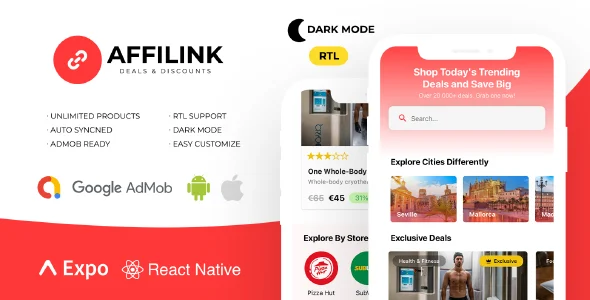
AffiLink Mobile Overview & Mobile Affiliate Storefront Client
AffiLink Mobile is a React Native and Expo.io mobile application source code, engineered for developers and agencies to deploy native iOS and Android clients for affiliate deal, coupon, and store listing platforms. It removes the cost of building a mobile affiliate storefront from scratch by supplying a prebuilt client layer that consumes the AffiLink web backend over REST/JSON endpoints for every deal, store, and review record. In production delivery workflows it functions as the consumer-facing handheld layer of an affiliate deals directory, rendering offers, store pages, categories, and location-scoped listings on phones and tablets.
Technical Specifications & Deployment Matrix
| Engineering Metric | Deployment Specification |
|---|---|
| Base Technology / Framework | React Native with Expo.io, tracking Expo SDK 50 in release 3.0.0 (February 2024) |
| Runtime / Language Requirements | JavaScript source; Node.js toolchain for dependency installation and release builds |
| Data Exchange / Communication Protocols | REST/JSON API consumption against the AffiLink web backend |
| Monetization & Engagement Services | Google AdMob banner ads; OneSignal push notifications (added in v3.0.0) |
| Platform Targets / Included Files | iOS and Android application source, API layer, and documentation |
AffiLink Mobile Client Architecture & Deal Delivery Pipeline
Deal delivery in AffiLink Mobile follows a REST/JSON request cycle against the AffiLink web backend. On launch, the Expo runtime boots the React Native bundle, initializes the navigation container, and requests the deals feed, store directory, category tree, and location list from the backend API. Search inputs are transmitted as query parameters, while filter selections spanning title, price, rating, store, category, subcategory, and location are composed into compound conditions that the backend evaluates before returning a JSON payload. The client deserializes that payload, maps deal records into list and detail views, and updates component state so browsing, review submission, and sharing remain consistent across navigation events.
User identity is handled through an email and password sign-in and sign-up flow. Authenticated sessions unlock review submission and deal sharing, and share actions delegate to the native platform share sheet exposed through the React Native bridge. Monetization and re-engagement run through two external services wired into the client: AdMob serves banner placements within the interface, while OneSignal registers each installed device so push campaigns can be dispatched to iOS and Android users from the operator’s dashboard.
Core Technical Capabilities of AffiLink Mobile
- Multi-parameter search and filtering: Deal queries accept title, price, rating, store, category, subcategory, and location conditions, letting users narrow large inventories server-side before results render, which keeps list screens responsive on low-end devices.
- Email-based authentication: A sign-in and sign-up flow built on email and password credentials establishes the session state required before a user can submit reviews or share deals.
- Dual-theme interface state: A dark and light mode toggle switches the visual palette across deals lists, store pages, and search views, with the preference applied as a persistent application state rather than a per-screen style override.
- AdMob banner monetization: Banner placements are wired into the client’s screen layout, requiring only the operator’s own AdMob unit identifiers during configuration.
- OneSignal push registration: Device tokens are registered at startup under the operator’s OneSignal project, enabling campaign dispatch to the full installed base after the v3.0.0 integration.
For studios weighing a separate, independent Android-first codebase aimed at local offers, coupons, events, and service bookings rather than affiliate feed aggregation, NearbyStores Android exists as a parallel self-hosted project with its own module set; it is neither merged into nor dependent on the AffiLink API.
Production Implementation & Operational Resilience
The package ships as readable JavaScript source for the React Native and Expo.io stack, currently aligned with Expo SDK 50 after successive upgrades from SDK 47 and 48 across earlier releases. Deployment requires three prerequisites: a Node.js environment to install dependencies and run the Expo build pipeline for iOS and Android binaries, a reachable AffiLink web instance whose API endpoint is configured in the client, and replacement of the default AdMob unit identifiers and the OneSignal app identifier with the operator’s own credentials before store submission.
Because every screen depends on backend responses, production hardening centers on API resilience. Deal lists and store pages should degrade to empty-state views when a request fails, review and share actions must be gated behind session validation, and payloads arriving from the backend are deserialized into typed list structures before rendering so malformed records do not break the feed. The documented codebase remains open to developer customization: colors, iconography, layout components, and API wiring are all editable at source level, which is the intended path for brand-specific restyling or additional filter dimensions.
Where a delivery scope also calls for a browser-based storefront outside the React Native runtime, Tokoo supplies a separate WooCommerce storefront path for affiliate, dropship, and multi-vendor electronics sites; it operates as an independent web deliverable rather than an extension of the mobile codebase.
Frequently Asked Questions
Does AffiLink Mobile operate as a standalone application without a backend?
No. The package functions as a client layer and requires the separately distributed AffiLink web platform as its data source. Deal records, store listings, category trees, and review payloads are all fetched from that backend’s API, so the mobile source cannot serve content on its own.
Can the deals list be filtered by rating, price, and location at the same time?
Yes. The deals list supports filtering across title, price, rating, store, category, subcategory, and location parameters. Selections are composed into query conditions evaluated by the backend, letting users narrow large deal inventories before committing to a specific offer.
Are push notifications delivered through a configurable provider?
Yes. Version 3.0.0 introduced OneSignal as the push notification service, replacing earlier release lines that shipped without native push. Integrators register the app against a OneSignal project, configure the application identifier, and dispatch campaigns to installed iOS and Android clients.
Does the interface include a persistent display preference beyond the default theme?
Yes. A dark and light mode toggle ships in the interface, giving each end user a persistent display preference. The theming state is applied across deals lists, store pages, and search views, so the selected palette carries through the session without extra configuration.
Does the documented monetization layer include interstitial or rewarded ad formats?
No. The release documentation specifies AdMob banner placements as the supported monetization format. Developers needing interstitial or rewarded units would extend the ad module within the React Native source, since only the banner integration is covered in the shipped implementation.