Advanced Slider Blog Layout Design
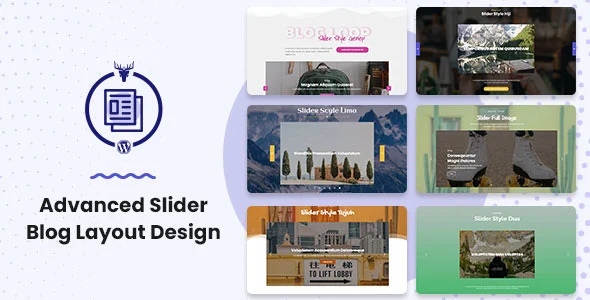
Advanced Slider Blog Layout Design Overview & Slider Rendering Engine
Advanced Slider Blog Layout Design is a WordPress layout-builder extension engineered for agencies and site builders who need to render blog archives as interactive sliders. The module operates as an additional function of the Blog Layout Awesome plugin, extending its rendering pipeline with slider-specific customization and layout optimization. Within production workflows, it functions as the presentation layer that converts standard WordPress post loops into horizontally navigable, filterable blog carousels without hand-coding template overrides.
Technical Specifications & Deployment Matrix
| Engineering Metric | Deployment Specification |
|---|---|
| Base Technology / Framework | WordPress plugin (extension module of Blog Layout Awesome), PHP-driven |
| Runtime / Version Requirements | WordPress 5.7.x through 6.2.x |
| Page Builder Interoperability | Elementor, Cornerstone, Layers WP, Gutenberg editor (optimized) |
| Delivered Source Assets | JavaScript JS, HTML, CSS, PHP files |
| Browser Compatibility | IE11, Firefox, Safari, Opera, Chrome, Edge |
| Plugin Ecosystem Coexistence | bbPress 2.5.x, Easy Digital Downloads, Gravity Forms |
Blog Carousel Construction & Execution Pipeline
The engine receives published posts through a custom post type query, then pushes the resulting loop into a slider template where layout, filtering, and pagination states are rendered client-side. Because the package ships as an additive function of the Blog Layout Awesome core, activation follows a parent-child dependency pattern: the parent plugin handles loop assembly, taxonomy mapping, and template registration, while this module injects the slider viewport, transition behavior, and hover choreography into the rendering stage.
The signature interaction is a hover-state animation in which the blog information panel translates upward and displaces the featured image position, paired with a rectangular slider frame. This is implemented through CSS transform transitions dispatched on pointer events over each slide node, keeping the motion GPU-composited rather than layout-thrashing. Content discovery is handled through a blog filter interface, and archive traversal is supported by three pagination models: load more, infinite scroll, and classic numbered pagination.
Core Technical Capabilities of Advanced Slider Blog Layout Design
- Custom Post Type Blog Filter: Registers a dedicated post type with an associated filter mechanism, letting visitors narrow the slider contents by taxonomy at runtime without page reloads.
- Tri-Mode Pagination Engine: Implements load more buttons, infinite scroll observers, and numbered pagination with center, left, right, or custom alignment, all configurable per layout instance.
- Load More Color State Controls: Exposes text color, background color, text hover color, and background hover color parameters for the load more control, enabling per-brand styling directly from the layout settings.
- Blog Lightbox: Attaches a lightbox overlay to slider media so full-size imagery can be inspected without leaving the archive view.
- Category Display Layer: Renders category assignments on each slide node, keeping taxonomy context visible inside the carousel viewport.
For studios assembling broader front-end systems, Card Elements Pro for Elementor covers adjacent grid and card widget requirements as an independent Elementor widget set, which sits alongside this module in an Elementor-based build rather than merging into its codebase.
Production Implementation & Operational Resilience
Deployment requires the parent Blog Layout Awesome plugin to be active, since the slider module resolves its loop-building and template registration logic against that core; running it standalone produces an unmet dependency at load time. The package has been verified against WordPress 5.7.x through 6.2.x, and its PHP, JavaScript, CSS, and HTML source files can be inspected and modified directly when a project demands bespoke transition timing or structural markup changes beyond the exposed color and alignment settings.
From a rendering-resilience standpoint, browser coverage spans IE11 in addition to current Chrome, Firefox, Safari, Opera, and Edge builds, which constrains the CSS feature set to transform-based animations that degrade predictably on legacy engines. Builder interoperation covers Elementor, Cornerstone, and Layers WP, and the module is optimized for the Gutenberg editor, so slider layouts can be embedded in both block-based and page-builder page graphs. Coexistence with bbPress 2.5.x, Easy Digital Downloads, and Gravity Forms is documented, making it viable on community and commerce hybrids.
Secondary development boundaries are defined by the delivered source: styling overrides live in the CSS layer, interaction behavior in the JavaScript layer, and loop/template logic in PHP. Pagination color states and alignment are handled through the admin settings surface, so most presentation tuning requires no code edits. Once slider archives are published, content discoverability becomes the operational concern; deploying Rank Math SEO Pro addresses on-page schema, sitemap generation, and redirect management for the archive URLs that this layout engine emits.
Frequently Asked Questions
Does Advanced Slider Blog Layout Design function as a standalone plugin without Blog Layout Awesome installed?
No, the module is documented as an additional function of the Blog Layout Awesome WordPress plugin, meaning the parent plugin supplies the core loop-building and layout infrastructure that the slider extension builds upon at runtime.
Are pagination visual states limited to fixed alignment presets?
No, pagination alignment supports center, left, right, and customized positions, and the load more control exposes separate text, background, text hover, and background hover color parameters for per-instance visual configuration.
Can visitors filter slider content and enlarge images without leaving the archive page?
Yes, the module includes a custom post type blog filter for narrowing displayed posts and an integrated blog lightbox that overlays full-size media directly within the slider view.
Which editor environments support embedding these slider layouts?
The module is optimized for Gutenberg and is documented as compatible with Elementor, Cornerstone, and Layers WP, allowing slider blog layouts to be placed within both block-editor and page-builder page structures.