Advanced Product Features Showcase for Elementor
Advanced Product Features Showcase for Elementor Overview & Widget-Layer Extension
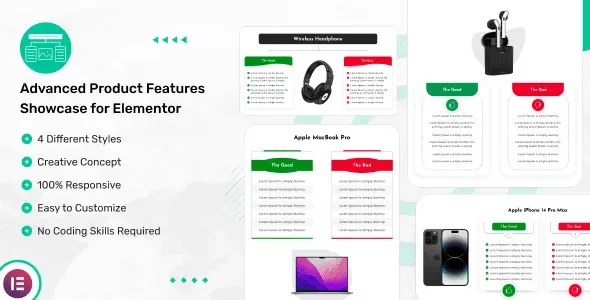
Advanced Product Features Showcase for Elementor is a WordPress plugin engineered as a dedicated Elementor addon, built for agencies, affiliate marketers, and store owners who need to publish structured product feature presentations without hand-coded markup. It addresses a concrete gap in the stock Elementor widget library, which ships no purpose-built module for rendering good-versus-bad feature matrices, single-product showcases, or pros-and-cons sections, forcing builders to assemble such layouts manually with generic columns. Within production delivery workflows, the package functions as a drop-in widget layer that installs, activates, and exposes four prebuilt showcase designs directly inside the Elementor editor panel.
Technical Specifications & Deployment Matrix
| Engineering Metric | Deployment Specification |
|---|---|
| Base Technology / Framework | WordPress plugin (PHP) extending the Elementor page builder widget system |
| Runtime / Language Requirements | WordPress 4.9.x through 7.0.x running on a standard PHP-capable host |
| Front-End / Engine Dependencies | Elementor page builder (compatible with both free and Pro editions) |
| Asset Deliverables | JavaScript JS, HTML, CSS, and PHP source files |
| Browser Matrix | Firefox, Safari, Opera, Chrome, and Edge |
| Data / Persistence Footprint | Widget settings persist inside the standard WordPress and Elementor content storage pipeline; no custom database schema is documented |
Good/Bad Feature Rendering & Execution Pipeline
The module renders structured good-and-bad feature matrices through a native Elementor widget registered in the editor panel. Architecturally, activation follows the standard WordPress plugin lifecycle: the PHP entry point loads during initialization, registers its widget class against Elementor’s widget manager, and injects its CSS and JS assets on pages where a widget instance is placed. When a builder drags the widget onto the canvas, the control panel exposes fields for the showcase title, the good-feature list, and the bad-feature list, organized across content and style tabs. Each configuration is stored as element data within the page’s builder JSON, so revisions, template exports, and duplication behave identically to any first-party widget. On the front end, the server emits HTML with scoped styles, while JavaScript drives the prebuilt button hover effects without requiring custom scripting from the implementer.
Column counts are configurable per device class: separate desktop, iPad/tablet, and mobile controls let a single section reflow from multi-column grids to stacked layouts at each breakpoint, eliminating the need for duplicated device-specific sections. For delivery teams whose widget requirements extend beyond these four showcase designs, The Plus Addons for Elementor Pro operates as an independent widget pool on the same builder runtime, broadening the available element catalog without modifying this plugin’s rendering pipeline.
Core Technical Capabilities of Advanced Product Features Showcase for Elementor
- Four Prebuilt Design Variants: each layout ships as a ready-made showcase template, allowing a product section to be re-skinned by switching the design type rather than rebuilding the element tree.
- Per-Breakpoint Column Control: independent desktop, tablet, and mobile column settings restructure the grid at each viewport tier, producing a 100% responsive layout from one widget instance.
- Granular Styling Parameters: colors for all content elements, border variants, box-shadow values, and button hover states are editable per instance through the visual style controls.
- Translation-Ready String Layer: a bundled .pot file exposes front-end strings to gettext-based localization workflows, enabling multi-language deployments without touching plugin source files.
Production Implementation & Operational Resilience
Deployment follows the conventional WordPress path of upload, activate, and build, with no database migration steps or external service dependencies, which keeps staging-to-production promotion predictable across agency environments. The widget output is theme-agnostic: the vendor verifies operation with all standard WordPress themes rather than a single proprietary stack, and front-end rendering holds across Firefox, Safari, Opera, Chrome, and Edge, which trims cross-browser QA cycles before client sign-off. Because responsiveness is handled at the CSS level, no device-specific page variants are required; the per-breakpoint column options centralize reflow management inside one element.
Operational boundaries deserve attention before rollout. The package is not optimized for the Gutenberg block editor, so all composition must occur within an Elementor editing context. The codebase is documented as lightweight, constraining payload overhead on pages where the widget is active, and the emitted markup is structured with SEO considerations for crawlable, indexable feature content, a relevant property for affiliate review pages targeting long-tail product queries. For studios constructing complete single-product storefronts rather than isolated page fragments, Drone – Single Product WordPress Theme exists as a separate theme-level implementation path outside this plugin’s scope. Secondary development on the module itself is bounded to styling: colors, borders, shadows, and hover parameters are adjustable through the UI, while the four layout structures are consumed as delivered designs rather than editable templates.
Frequently Asked Questions
Does the plugin function inside the Gutenberg block editor?
No. The package is explicitly documented as not Gutenberg-optimized; its widget registration targets the Elementor editor, so every showcase layout must be composed within an Elementor editing context rather than the native block system.
Can front-end strings be localized for non-English deployments?
Yes. A .pot translation file ships with the plugin, exposing interface and front-end strings to standard gettext workflows, so language packs can be compiled and loaded without modifying the core PHP, CSS, or JavaScript source files.
Is coding knowledge required to configure the showcase layouts?
No. The widget operates entirely through drag-and-drop placement and visual controls covering titles, good and bad feature lists, colors, borders, box shadows, and hover states, requiring no manual PHP, CSS, or JavaScript authoring at any point.
Is the plugin suitable for affiliate product review websites?
Yes. The vendor documentation cites affiliate product presentations as a primary use case, since the good-and-bad feature format maps directly onto pros-and-cons review sections commonly deployed on affiliate comparison pages.
-
v1.0.6 LatestNov 1, 2026