Admania – Adsense WordPress Theme With Gutenberg Compatibility
Admania Overview & Ad-Revenue Rendering Architecture
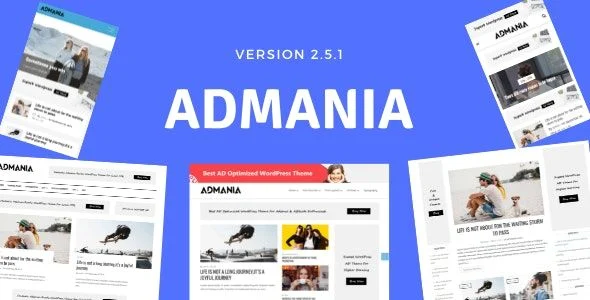
Admania is an ad-optimized WordPress theme engineered for publishers, affiliate marketers, and content-heavy blog operators whose revenue depends on high-CTR ad placement. The codebase targets the structural bottleneck that generic themes impose on monetized sites: ad slots bolted on as afterthoughts, which produces layout shift, weak mobile inventory, and silent losses to ad-blocking extensions. Within production workflows, it operates as a self-contained presentation layer that ships reserved ad zones, an ad-blocker detection layer, AMP rendering, Schema.org markup, and WooCommerce template support in a single package.
Technical Specifications & Deployment Matrix
| Engineering Metric | Deployment Specification |
|---|---|
| Base Technology / Framework | WordPress theme (PHP / MySQL environment), native block-editor workflow |
| Editor Runtime | Full compatibility with the WordPress block editor (Gutenberg) |
| Rendering Variants | AMP output path for accelerated mobile page delivery |
| SEO / Data Layer | Schema.org structured data emitted with rendered markup for rich-snippet eligibility |
| Commerce Layer | WooCommerce-ready templates for shop, product, and cart views |
| Front-End Footprint | Performance-tuned, lightweight asset base targeting healthy Core Web Vitals |
Ad Placement Engine & Front-End Rendering Pipeline
Admania routes ad inventory through placement zones reserved at template level, before any ad script executes. When a visitor requests a page, the engine resolves the appropriate template from its set of homepage layouts, hydrates each configured ad zone with the assigned creative, and outputs markup wrapped in Schema.org microdata that search crawlers parse for rich snippets. Zone geometry is fixed in the DOM tree ahead of script execution, so ad payloads cannot trigger the reflow-driven layout shift that inflates CLS scores on unoptimized themes. On mobile requests, an AMP rendering path serves a stripped, cache-friendly variant that keeps ad containers visible while eliminating most render-blocking assets from the desktop payload. Sticky ad logic anchors units to persistent viewport positions so inventory retains impression share across scroll depth, capturing the lower-page visibility that standard inline placements lose. The ad-blocker detection layer complements this pipeline by verifying whether ad requests are being intercepted client-side, converting silent revenue loss into an addressable visitor interaction rather than dropped impressions.
For editorial teams that need dynamic listings, query loops, or custom content relations layered onto the same block-editor workflow, integrating JetEngine extends Gutenberg content modeling without hand-written PHP registration code, while the theme continues to own the ad-zone presentation layer.
Architectural & Functional Highlights
- Reserved Ad Placement Zones: Ad containers occupy dedicated positions in high-visibility regions of the template, defined at render time so slot dimensions are committed before ad networks respond, preventing cumulative layout shift.
- Ad-Blocker Detection & Notification: A client-side interception check identifies blocked ad requests and surfaces an on-page notification prompt, giving publishers a recovery mechanism instead of passive impression loss.
- AMP Rendering Pipeline: Paired AMP templates produce mobile pages with a fraction of the standard stylesheet and script footprint, keeping ad containers above the fold on constrained connections.
- Schema.org Output Layer: Structured data is emitted alongside rendered content, registering entities for rich-snippet treatment in search indexes without requiring a separate SEO plugin configuration.
- Performance-Tuned Asset Base: The stylesheet and script footprint is deliberately minimal, reducing parse and execution cost on the critical rendering path for content-heavy archives.
Production Implementation & Operational Resilience
Deployment follows the standard WordPress theme path: upload the package, activate it, then assign a homepage layout and populate ad zones through the theme’s configuration panels. In agency staging environments, the safer sequence is validating Gutenberg block rendering first, confirming zone geometry with placeholder creatives, and only then attaching live ad-network code. Because ad zones are template-level constructs, customization should be handled through a child theme so modified template files override the parent via the standard WordPress template hierarchy and survive parent-package version changes. No custom database tables or elevated memory thresholds form part of the documented footprint, keeping hosting requirements inside conventional WordPress envelopes.
When the WooCommerce layer is activated, commerce-ready templates render shop, product, and cart views consistent with the ad-first layout system. Teams assembling that storefront with block tooling generally extend it with WowStore Pro to compose product grids, filtering, and cart interactions directly in the Gutenberg canvas while the theme governs surrounding ad inventory.
Operational boundaries worth respecting before launch: AMP variants render a reduced feature surface, so custom blocks and interactive widgets must be validated against the AMP path, and the ad-blocker notification should be tested against common browser extension configurations to confirm it degrades gracefully. For publishers weighing a dedicated newsroom foundation instead of an ad-centric one, ZoxPress exists as a parallel magazine option within the same publishing ecosystem, positioned for editorial-heavy rather than monetization-heavy operations.
Frequently Asked Questions
Can advertisers submit ad creatives from the front end without a WordPress dashboard account?
Yes, the package includes a front-end ad submission mechanism that collects user-generated advertisements through the public interface, keeping external advertisers outside wp-admin while their creatives enter the site’s ad inventory flow.
Are sticky ad units available in the header and footer, or only in sidebars?
Yes, sticky placement options cover three positions — header, footer, and sidebar — so persistent units can remain inside the viewport across scroll depth on both desktop and mobile rendering paths.
Does WooCommerce readiness mean the commerce plugin ships bundled inside the theme package?
No, WooCommerce readiness refers to template-level support for shop, product, and cart views. The WooCommerce plugin itself supplies the commerce backend and must be installed separately before those store templates render.
-
2.5.3 LatestSeptember 29, 2026