Fillow Saas Admin Dashboard Template
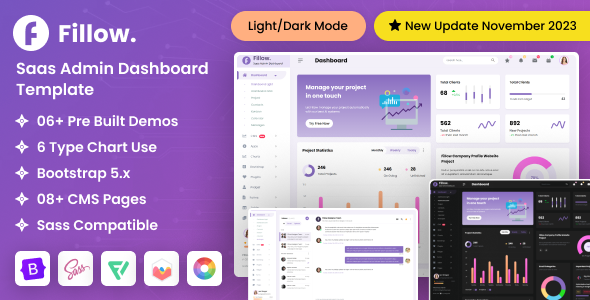
Fillow: Engineering Overview & Architecture
Fillow Saas Admin Dashboard Template is an HTML5-based front-end template built on a Bootstrap 5 grid system with SCSS-driven theming layers, engineered for product managers, full-stack developers, and SaaS founders who need a production-ready administrative interface. Its internal page architecture relies on semantic HTML5 markup with shallow DOM nesting—each dashboard widget is composed of a maximum of four wrapper levels—so browsers avoid excessive reflow calculations when rendering dense data tables with 500+ rows. Chart and widget data flows through a clean separation between markup and logic: Chart.js and ApexCharts instances consume JSON data structures defined at the bottom of each page, which means a single fetch call can repaint graphs, counters, and table fragments without triggering a full document reload. Component assembly is delivered through prebuilt HTML partials that drop directly into any stack—static hosting, Laravel Blade views, Next.js pages, or Express-rendered templates—because the runtime carries zero server-side dependencies. A centralized SCSS variables file controls the entire configuration surface, exposing parameters for the primary color palette, sidebar collapse behavior (mini vs. icon-only states), dark-mode token overrides, border-radius scale, and grid gutter widths, all recompiled through a single Gulp or Vite build command.
Key Functional Features of the Fillow Template for Modern Deployments
- 150+ Prebuilt Application Pages: Every page ships as standalone static HTML with consistent header, sidebar, and footer partials, covering kanban boards, chat interfaces, e-commerce product grids, file managers, and calendar views that render identically across Chrome, Firefox, Safari, and Edge.
- Dual Charting Engine Integration: ApexCharts handles time-series and candlestick visualizations while Chart.js drives doughnut and bar widgets; both libraries initialize from isolated config objects, allowing data source swaps without touching markup structure.
- Tailwind-Style Utility Layering with Bootstrap 5: The SCSS source exposes utility mixins for spacing, typography scale, and flex/grid composition, so layout adjustments compile down to pure CSS with no additional JavaScript payload at runtime.
- Sub-Pixel Responsive Breakpoint System: Media queries are defined at Bootstrap 5 breakpoints (576px, 768px, 992px, 1200px, 1400px), with the sidebar converting to an off-canvas drawer below 992px and data tables switching to horizontal scroll containers below 768px.
- Dark and Light Theme Switching: A CSS custom-property token system swaps 40+ color variables at runtime through a single class toggle on the root element, persisting state via localStorage with zero page repaint flash on reload.
- Form Validation and Input Components: Pre-wired validation states, select2 dropdowns, date range pickers, and file upload zones are included as copy-paste blocks with documented markup patterns and inline error-state styling already defined in the stylesheet.
Production Deployment & Use-Case Scenarios
- SaaS Analytics Console: A subscription platform can wire its REST endpoints into the existing stat-card and chart components, replacing the JSON placeholder arrays and deploying a complete metrics dashboard within a single sprint.
- E-Commerce Back Office: Product grids, order tables, and invoice pages ship with pagination markup and status badge variants, letting an operations team publish an internal order-management portal by binding only server templates to the static layouts.
- Project Management Workspace: The kanban board and task list components support drag-and-drop interaction through bundled jQuery UI hooks, providing an internal team tool ready for integration with existing issue-tracking APIs.
Technical Architecture & Compatibility Standards
Fillow compiles against Bootstrap 5.2+, jQuery 3.x (scoped to interactive components only), and a Node-based SCSS build chain, with no server-side language requirement, no database dependency, and no framework lock-in. The package includes source SCSS files, compiled CSS, minified assets, documentation pages, and Figma design references, so a team can either deploy the compiled output directly or extend the source layer for custom design tokens. Browser support covers the last two major versions of all evergreen browsers, and the stylesheet avoids legacy vendor prefixes, keeping the production CSS bundle under 300 KB minified.
Performance targets align with Core Web Vitals expectations for template-based builds: the largest contentful paint element on the default dashboard is a static stat card (no lazy-load penalty), inline critical CSS is supported through the build configuration, and zero-dependency pages such as login and error screens render with JavaScript disabled. Interoperability extends to any templating environment—Laravel Blade, Django templates, Rails ERB, Vue single-file components, or React fragments—because every layout is plain HTML that can be split into partials without a transpilation step.
Frequently Asked Questions
Does Fillow include both light and dark color schemes out of the box?
Yes, the template ships with a token-based theme system that toggles between light and dark modes through a single root class switch, with the preference stored in localStorage.
Can I integrate Fillow into a Laravel or Django back-end project?
Yes, every page is plain semantic HTML5, so the layout partials can be split into Blade, ERB, or Django template includes without any transpilation or framework adaptation.
Does the Fillow template require jQuery for all pages?
No, static pages such as login, registration, and error screens render fully with JavaScript disabled, and jQuery is loaded only on pages that use interactive components like the kanban board or date pickers.
Is the chart data on the dashboard pages replaceable with live API data?
Yes, each ApexCharts and Chart.js instance initializes from an isolated JSON config object, so a fetch call can inject live endpoint data and repaint the charts without modifying markup.
Does Fillow provide SCSS source files and build tooling for customization?
Yes, the package includes the full SCSS source tree with a variables file controlling colors, spacing, radius scale, and sidebar states, plus Gulp and Vite build configurations for recompiling assets.