 My Account
 ✅ Product Overview
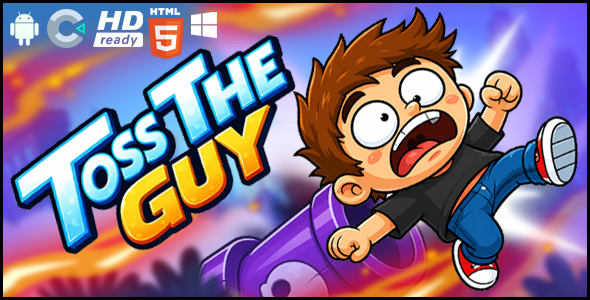
Toss the Guy HTML5 Premium Game is a complete, ready-to-deploy interactive game built with Construct 3, designed for web-based entertainment platforms. This script provides a simple yet engaging ragdoll physics experience, ideal for casual gaming websites, personal portfolios, or adding a fun interactive element to a blog. It targets webmasters, game enthusiasts, and developers looking for a pre-built, customizable game solution.
- Core Utility: Provides a complete, embeddable HTML5 ragdoll physics game.
- Target Audience: Webmasters, casual game site owners, content creators, HTML5 game developers.
- Primary Stack/Requirement: HTML5, JavaScript, Construct 3 (for editing).
This game stands out for its immediate playability and straightforward integration. Its core mechanic, involving simple drag-and-release physics, makes it instantly accessible to players of all ages, requiring no prior instructions to begin interacting.
For developers, getting Toss the Guy HTML5 Premium Game Construct 3 running is a matter of exporting and uploading. The provided source ensures a clear path for asset replacement and minor gameplay tweaks, making it a versatile base for custom projects.
The responsive design implementation means the game canvas dynamically adjusts, providing a consistent user experience across varied devices. This attention to cross-platform usability ensures that Toss the Guy HTML5 Premium Game maintains its engaging qualities whether viewed on a desktop monitor or a smartphone.
The underlying architecture, powered by Construct 3, offers a robust foundation for smooth physics simulation and efficient asset loading. This framework ensures a low barrier to entry for content modification while delivering fluid gameplay.
✅ Highlights & Value
- Intuitive Drag-and-Release Gameplay: Users interact directly by clicking and dragging the character model across the screen, then releasing to launch. The physics engine immediately calculates the trajectory and impacts, displaying real-time ragdoll movement.
- Responsive Display Across Devices: The game automatically scales its canvas to fit various screen sizes, from mobile phones in portrait or landscape orientation to desktop browsers, maintaining aspect ratio and playability without user intervention.
- Integrated Sound Effects: Actions like launching the character, impacts with the environment, and a restart prompt are accompanied by distinct sound effects, enhancing player feedback and immersion. Sounds can be toggled via the Construct 3 editor.
- Easy Customization Workflow: The included Construct 3 source file allows direct modification of sprites, background images, and sound assets. Developers can replace character models, environment textures, and audio cues within the Construct 3 interface, then export with updated assets.
- Immediate Restart Functionality: A prominent “Restart” button or on-screen prompt is available after each round, allowing players to quickly re-engage without navigating away or refreshing the page.
✅ Real-World Use Cases
- Casual Gaming Portals: Integrate as a quick, replayable distraction within a larger collection of browser-based games, offering visitors a simple, satisfying physics experience.
- Personal Portfolio or Blog Enhancement: Embed the game directly into a “fun” section or as an interactive element on a personal website, showcasing web development capabilities or providing a lighthearted break for visitors.
- Educational or Training Modules (Physics Demonstration): Adapt the game with custom graphics to visually demonstrate basic physics principles like force, trajectory, and impact for introductory web-based learning content.
✅ Technical & Compatibility
| Item Type | HTML5 Game |
|---|---|
| Core Framework / Language | Construct 3 / HTML5, JavaScript |
| Minimum Environment / Requirements | Modern Web Browser (Chrome, Firefox, Edge, Safari), Web Server (for deployment) |
| Key Integrations / APIs | LocalStorage (for potential high score tracking, not default), Web Audio API |
| Distribution Standard | 100% Clean, Verified, Full Source Included |
Deploying Toss the Guy HTML5 Premium Game Construct 3 involves exporting the project from Construct 3 as an HTML5 web project. The output is a standard index.html file along with associated asset folders (images, audio, scripts). This bundle can then be uploaded to any standard web server (Apache, Nginx) or integrated into an existing web application by placing the files in a public-facing directory. No specific server-side programming or database is required for core functionality, making deployment straightforward.
✅ FAQ & Tips
Q: How straightforward is it to get this game running on my website?
A: The game is ready-to-run directly after export from Construct 3. You simply upload the generated HTML, JavaScript, and asset files to your web server. It functions entirely client-side, so no complex server configuration is needed.
Q: Does the game adapt to different screen sizes and devices?
A: Yes, the game canvas is configured for responsive scaling. It automatically adjusts its dimensions to fit the available viewport width and height, ensuring a playable experience on desktops, tablets, and mobile phones, maintaining a consistent aspect ratio.
Q: Can I easily change the visuals and sounds of the game?
A: Yes, the full Construct 3 project file is included. Within the Construct 3 editor, you can directly replace sprite sheets for the character and background, as well as modify or substitute sound files. No code editing is required for asset changes.