 My Account
 ✅ Product Overview
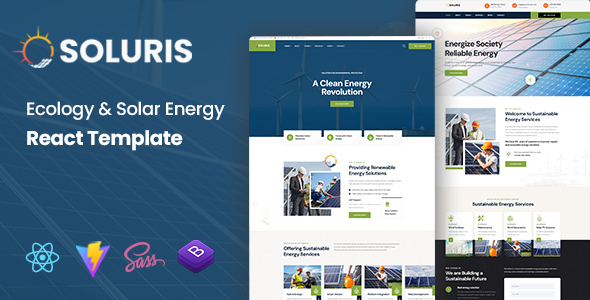
Soluris, an Ecology & Solar Energy React Template, provides a dedicated frontend solution for businesses and organizations operating in the sustainable energy sector. This Soluris – Ecology & Solar Energy React Template is designed for developers seeking a modern, responsive interface for their ecology, renewable energy, or environmental conservation projects, enabling a clean presentation of services and initiatives.
- Core Utility: Modern, modular frontend for sustainable energy web applications.
- Target Audience: React developers, environmental agencies, solar/wind energy providers.
- Primary Stack/Requirement: React.js, Node.js development environment.
✅ Highlights & Value
- Component-Based Structure: Inspecting the
src/componentsdirectory reveals distinct, self-contained units likeProjectCard.jsandServiceBlock.js. Modifying thetitleprop inServiceBlock.jswithin a parent component likeHomePage.jsimmediately updates the rendered heading across all instances on that page. - Responsive Layout Behavior: When resizing the browser window from desktop (e.g.,
min-width: 1024px) down to tablet or mobile widths, the main navigation menu visibly transforms. It collapses from a horizontal list of links into a clickable hamburger icon. Tapping this icon triggers a smooth, slide-out animation of a vertical menu, maintaining usability without full page reloads. - Interactive Data Presentation: The included data visualization components, such as
EnergyOutputChart.js, render dynamic bar or line graphs. On initial page load or when scrolled into view, these charts execute a brief animation (e.g., bars growing from zero) before displaying their full data. Data is passed as an array of objects via adataprop, making updates straightforward. - Optimized Asset Loading: During page navigation, large images (e.g., hero banners or project thumbnails) are configured with
loading='lazy'attributes. This behavior is evident in network requests; images only begin downloading when they enter the visible viewport, improving the initial contentful paint time. Background video elements similarly initiate playback only once the component is fully mounted and in view. - Structured Project Listings: On the ‘Projects’ page, a grid of
ProjectItem.jsxcomponents displays. Each item presents a cropped thumbnail, a bold project title, and a truncated description. Clicking any item triggers a client-side route change via React Router, instantly loading a dedicatedProjectDetailPagewithout a full page refresh, preserving user context.
✅ Real-World Use Cases
- Solar Panel Installation Business: A company specializing in residential and commercial solar panel installations can utilize the
ServicesandProjectssections to showcase their offerings and completed installations, with customer testimonials integrated into theAboutpage. - Environmental NGO Portal: An environmental conservation organization could adapt the template to create a public-facing portal. This would allow them to present their mission, ongoing campaigns (using
BlogorNewscomponents), and ways for visitors to get involved or donate. - Renewable Energy Consulting Firm: A consulting firm advising on sustainable energy solutions can use the template’s structured content areas to outline their expertise, case studies, and team profiles, providing a professional online presence for B2B engagement.
✅ Technical & Compatibility
| Item Type | React Frontend Template |
|---|---|
| Core Framework / Language | React.js, JavaScript, SCSS |
| Minimum Environment / Requirements | Node.js 14+, npm/yarn |
| Key Integrations / APIs | React Router DOM, Axios (for API calls) |
| Distribution Standard | 100% Clean, Verified, Full Source Included |
Deploying this React template typically involves building the project using npm run build or yarn build, which generates a static build directory. This directory can then be served from any static file server (e.g., Nginx, Apache, or cloud services like Netlify/Vercel) or integrated into a Node.js backend. Ensuring the Node.js environment meets the specified version for compilation is crucial, along with correctly configuring environment variables for API endpoints if dynamic data fetching is implemented within this Ecology & Solar Energy React Template.
✅ FAQ & Tips
Q: How complex is it to customize the visual styling of the template?
A: The template uses SCSS for styling, organized into modular files. Customizing colors, fonts, or spacing typically involves modifying variables within a central _variables.scss file or directly editing component-specific SCSS modules. Changes compile rapidly during development, with immediate visual feedback in the browser.
Q: Does this template support progressive web app (PWA) features for offline access or installability?
A: While the Soluris – Ecology & Solar Energy React Template is built with React, it does not include pre-configured PWA service worker setups by default. However, its modular React foundation allows for the straightforward integration of PWA features using tools like Workbox or create-react-app’s built-in PWA capabilities, requiring explicit configuration post-deployment.
Q: What is the recommended workflow for integrating this template with a backend API?
A: For backend integration, the Soluris – Ecology & Solar Energy React Template is designed to consume data via RESTful APIs. Data fetching is typically handled using useEffect hooks and libraries like Axios or the native fetch API within React components. State management solutions like React Context or Redux can then distribute this data across the application. Configuring environment variables (.env files) for API base URLs is the standard practice for seamless deployment across different stages.