
 My Account
Product Overview
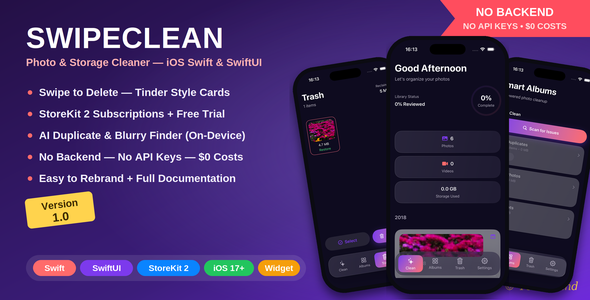
SwipeClean – Photo & Storage Cleaner iOS App is a robust, pre-built template designed for developers aiming to deploy a functional storage management utility. Leveraging Swift SwiftUI | Swipe to Delete, this app allows users to efficiently identify and clear redundant photos and videos from their iOS devices, targeting anyone struggling with overflowing camera rolls. It serves as a complete foundation for an app focused on optimizing mobile storage, presenting a clear path to deployment for entrepreneurs and developers alike.
Upon launching the application, after granting the necessary photo library permissions, the interface immediately begins scanning for various categories of media. The initial scan displays progress on a clean, unobtrusive overlay, typically completing within seconds for average photo libraries. Once analysis is complete, categories like “Duplicates,” “Similar Photos,” “Large Videos,” “Screenshots,” and “Blurred Photos” become available for review, each displaying a count of detected items.
Highlights & Value
- Intuitive Swipe-Based Deletion: The core interaction within the app involves a fluid “swipe-to-delete” gesture. When reviewing suggested items, swiping left moves an item to a temporary deletion pile, while swiping right keeps it. This direct, game-like interaction makes the cleanup process engaging rather than tedious.
- Intelligent Photo Analysis: The app doesn’t just look for exact duplicates. It uses advanced algorithms to identify photos that are visually similar, even if they aren’t identical copies. This is particularly useful for burst shots or multiple takes of the same scene.
- Optimized for Modern iOS: Built with Swift SwiftUI | Swipe to Delete, the codebase is contemporary and efficient, ensuring smooth performance on current iOS devices. This framework choice also simplifies customization and future updates for developers.
- Comprehensive Media Categorization: Beyond basic duplicates, the app effectively flags large videos that consume significant space, as well as less useful content like screenshots or images with noticeable blur. This granular categorization helps users make informed decisions about what to keep.
- User-Friendly Interface: The design prioritizes clarity and ease of use. Menus are straightforward, and the visual feedback during the swipe process is immediate, showing items being marked for deletion or retention without ambiguity.
Real-World Use Cases
- Personal Device Optimization: An everyday iPhone user with thousands of photos can quickly navigate through suggested deletions, reclaiming significant storage space without manually searching through the Photos app.
- Developer Starter Kit: For a developer looking to enter the mobile utility market, this SwipeClean – Photo & Storage Cleaner iOS App offers a ready-to-launch product. It provides a complete, functional codebase that can be rebranded and extended with additional features.
- Family Photo Management: A parent managing multiple devices or sharing a family iCloud account can use the app to periodically clean up accumulated photos, ensuring consistent device performance and available storage for new memories.
- Content Creator Efficiency: Photographers or videographers who take many shots and clips for their work often end up with numerous similar or redundant files. This app streamlines the initial culling process before more intensive editing.
Technical & Compatibility
The project is entirely built with Swift and SwiftUI, ensuring full compatibility with the latest iOS SDKs. It integrates seamlessly with the Photos framework for media access and management. Developers will find the project structure clean and modular, making it straightforward to implement new features or modify existing UI components. Features like Dark Mode support are baked in, automatically adjusting the app’s appearance based on the user’s system preferences, providing a polished experience out of the box. AdMob integration is included, offering a clear path to monetization by displaying banner or interstitial ads at strategic points, such as after a cleanup session concludes or during category selection.
FAQ & Tips
Q: Can the app recover deleted photos? A: Items “deleted” through the app are typically moved to the iOS “Recently Deleted” album, where they reside for 30 days before permanent removal. This provides a safety net, allowing users to restore items if they change their mind.
Q: How does the “similar photos” detection work? A: The app employs image analysis techniques to compare visual elements, colors, and compositions. It’s designed to flag photos that are nearly identical, even if taken moments apart, helping to declutter your library effectively.
Q: Is it easy to rebrand the app? A: Yes, given its SwiftUI foundation, modifying colors, fonts, and layout elements is relatively straightforward using standard Xcode tools. The project is designed with clear separation of concerns, simplifying asset replacement and localization efforts.






There are no reviews yet.