
 My Account
 Product Overview
MoneyWise Kids is a thoughtfully designed educational application, presenting a comprehensive Financial Literacy Game with Budgeting, Saving & Earning | iOS SwiftUI App specifically crafted for young learners. This interactive tool guides children through fundamental money management concepts, simulating real-world financial decisions within a secure, engaging environment. It functions as a standalone iOS application, providing a complete financial education curriculum directly on mobile devices.
When you first launch the app, a vibrant main menu appears, offering choices like ‘My Wallet,’ ‘Jobs,’ ‘Bank,’ and ‘Shop.’ Navigating to ‘My Wallet’ displays a clear overview of virtual cash, savings, and outstanding debts. The interface uses large, intuitive buttons and colorful icons, making it accessible for children as young as six. Gameplay progresses through structured levels where children earn money by completing ‘jobs’ – simple tasks like sorting virtual items or answering basic math questions – then decide how to spend, save, or invest their earnings.
Highlights & Value
Exploring MoneyWise Kids — Financial Literacy Game with Budgeting, Saving & Earning | iOS SwiftUI App reveals a carefully structured learning experience, designed to cultivate essential money management skills from an early age. The interactive elements provide immediate feedback, reinforcing positive financial habits.
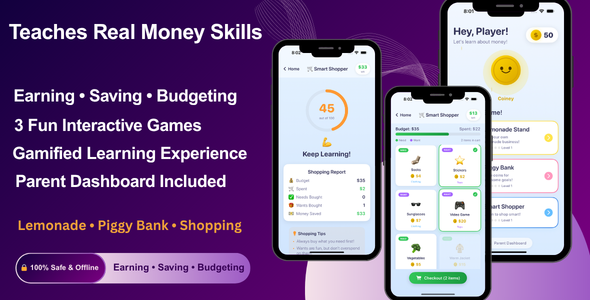
- Interactive Budgeting Modules: Users allocate virtual money for needs versus wants by dragging items into designated categories. The interface dynamically updates a pie chart, visually representing their spending distribution in real-time.
- Dynamic Saving Challenges: Children set specific savings goals, such as saving for a virtual toy. A visual progress bar fills up as virtual deposits are made, offering a clear and motivating tracker for their achievements.
- Simulated Earning Opportunities: Kids select from various ‘jobs’ displayed on a job board, each with different pay rates and task requirements. Completing tasks triggers a satisfying coin animation and instantly updates their virtual wallet balance.
- Debt & Loan Scenarios: Introduces basic concepts of borrowing and repayment. A simple ledger shows a clear deduction schedule and how virtual interest might accumulate, teaching the consequences of loans.
- Parental Oversight Dashboard: A separate, passkey-protected section allows parents to monitor their child’s progress, review their financial decisions, and adjust game difficulty settings to match learning pace.
Real-World Use Cases
The robust feature set within this Financial Literacy Game with Budgeting, Saving & Earning | iOS SwiftUI App lends itself to several practical applications beyond casual play, making it a valuable educational resource.
- Homeschooling Curriculum Aid: Integrates seamlessly as a supplementary tool for teaching economics and practical math, providing interactive practice for abstract financial concepts.
- Classroom Engagement: Teachers can project gameplay onto a screen to initiate discussions on financial responsibility, demonstrating various scenarios and outcomes live to the class.
- Family Financial Discussions: Parents can play alongside their children, using in-game events and decisions as natural prompts for real-life conversations about allowances, household budgets, and future financial planning.
- Therapeutic Learning for Specific Needs: The app’s highly visual and interactive nature can effectively assist children with certain learning differences in grasping sequential financial processes and cause-and-effect relationships.
Technical & Compatibility
From a technical perspective, MoneyWise Kids is built using Apple’s modern SwiftUI framework, ensuring native performance and a fluid user experience across iOS devices. This means smooth transitions between screens and responsive interactions, as expected from a well-engineered app. The project structure is clear, making it approachable for developers familiar with Xcode.
Deploying the MoneyWise Kids — Financial Literacy Game with Budgeting, Saving & Earning | iOS SwiftUI App requires a macOS environment with Xcode installed, along with an active Apple Developer account for App Store distribution. The codebase is designed for straightforward modification, allowing those with Swift and SwiftUI experience to customize game mechanics, add new content, or rebrand the application for specific educational initiatives.
FAQ & Tips
When exploring the capabilities of this Financial Literacy Game with Budgeting, Saving & Earning | iOS SwiftUI App, consider leveraging its adaptable structure. For instance, if you aim to integrate new earning scenarios or tailor spending categories, the modular SwiftUI views facilitate targeted adjustments without impacting the entire application logic. Always back up your project before making significant code changes. For optimal performance, ensure your Xcode version is up to date and test thoroughly on various iOS device simulators before deployment to the App Store.





There are no reviews yet.