
 My Account
✅ Product Overview
When I first set up Onest LMS for my online academy, integrating a reliable live conferencing solution was a priority. This is where the ZoomMeeting Addon – Seamless Video Conferencing and Collaboration comes in. It’s an essential extension designed specifically for the Onest LMS platform, enabling educators and course creators to host live Zoom meetings directly within their course content. This addon is ideal for anyone running an educational site that requires real-time interaction, from scheduled lectures and Q&A sessions to interactive workshops, providing a cohesive learning experience for students.
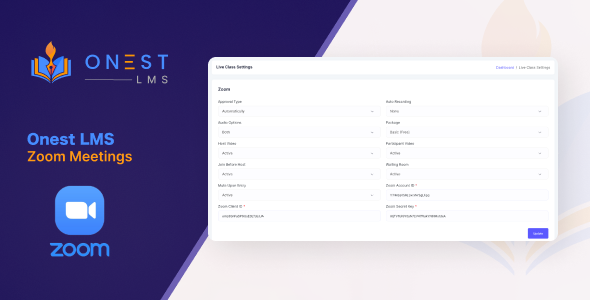
After installing the addon, I navigated to the Onest LMS settings, where a new “Zoom Integration” tab appeared. The setup involved inputting my Zoom API Key and Secret, which felt standard for any third-party integration. Once authenticated, the system showed a “Connected” status, indicating it was ready. When creating or editing a lesson within a course, a new “Add Zoom Meeting” option became available in the lesson editor. Clicking it brought up a straightforward form to schedule a meeting, where I could specify the topic, start time, duration, and even a custom password for the meeting if desired. This smooth workflow meant I rarely had to leave the WordPress dashboard to manage my live sessions.
✅ Highlights & Value
This addon brings several key advantages, making the overall experience with ZoomMeeting Addon – Seamless Video Conferencing and Collaboration truly integrated and streamlined for both instructors and students. Here’s what I found most valuable:
- Direct Meeting Integration: Instructors can schedule and manage Zoom meetings directly from the Onest LMS lesson editor. Students see the meeting details and a “Join Meeting” button right on the lesson page when the meeting is active, eliminating the need to search for links.
- Automated Sync: Once a meeting is scheduled in Onest LMS, it automatically creates the corresponding meeting in the linked Zoom account. Changes made within Onest LMS, like updating the time or topic, reflect in Zoom without manual intervention.
- User-Friendly Interface: The meeting creation form within the lesson editor is intuitive, mirroring typical Zoom scheduling options without requiring users to leave the WordPress dashboard or navigate a complex new interface.
- Pre-Meeting Countdown: Before a meeting starts, students see a clear countdown timer on the lesson page. This builds anticipation and ensures they know exactly when to join, reducing confusion.
- Post-Meeting Access Control: After the meeting concludes, the “Join Meeting” button either disappears or is replaced with a customizable message, managing student expectations effectively about joining past sessions.
✅ Real-World Use Cases
For practical application, I’ve found this addon invaluable in several scenarios:
- Live Q&A Sessions: Hosting weekly live Q&A sessions for a coding course, allowing students to ask questions directly and get immediate feedback from the instructor. The meeting link is always where they expect it, on the lesson page.
- Interactive Workshops: Conducting hands-on workshops where students share screens and collaborate in real-time on design projects or writing exercises, all within the familiar course environment.
- Guest Speaker Lectures: Inviting industry experts to deliver live lectures to students, enhancing course content with external perspectives, all managed through the Onest LMS – ZoomMeeting Addon – Seamless Video Conferencing and Collaboration interface.
- Virtual Office Hours: Providing dedicated virtual office hours for students to drop in and discuss course material or assignments in a more personalized setting without the hassle of sharing external links.
✅ Technical & Compatibility
The Onest LMS – ZoomMeeting Addon – Seamless Video Conferencing and Collaboration requires a functional Onest LMS installation and an active Zoom account with API access enabled. I found it compatible with my existing WordPress setup, running a standard theme and a handful of other common plugins like Yoast SEO and WooCommerce, without any noticeable conflicts. The addon utilizes the Zoom API, ensuring secure and reliable communication between your site and Zoom. It handles meeting creation, attendee management (joining), and status updates. When a meeting is scheduled, a dedicated block or shortcode is inserted into the lesson content, which then dynamically renders the meeting information and join button on the front end of your site.
✅ FAQ & Tips
- API Key Management: Ensure your Zoom API Key and Secret are correctly entered and that your Zoom account is configured to allow API access. If meetings aren’t syncing or appear with errors, this is the first place to check in the addon’s settings.
- Time Zone Settings: Double-check your WordPress site’s time zone settings match your Zoom account’s settings to avoid scheduling discrepancies. This prevents confusion for students regarding meeting start times.
- Student Experience: Encourage students to test their Zoom connection beforehand. The “Join Meeting” button opens Zoom directly, so having the client installed is beneficial for a smoother experience.
- Troubleshooting Join Issues: If the “Join Meeting” button doesn’t appear for students, verify the meeting status within the Onest LMS lesson editor. It needs to be marked as “Active” or “Scheduled” and within the specified time window for visibility.


There are no reviews yet.