
 My Account
✅ Product Overview
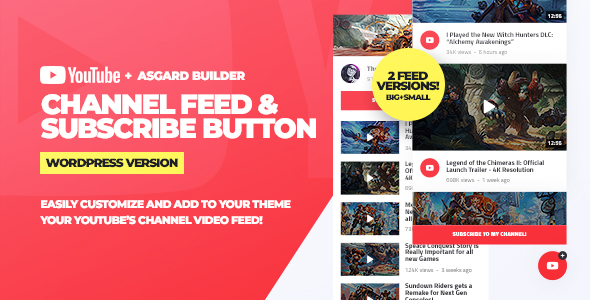
Youtube Channel Feeds and Subscribe Box WordPress Plugin provides a visual widget designed to connect your social media content directly to a WordPress site. This plugin retrieves your profile banner, logo, and active subscriber count, displaying them within a clean box format on your widget-ready areas. By pulling dynamic content straight from your channel feed, it helps you display a continuously refreshed stream of your latest video uploads. Site visitors can instantly view video thumbnails, read titles, and click a direct subscription link without having to leave your website.
When you configure the Youtube Channel Feeds and Subscribe Box WordPress Plugin, the system automatically handles API communication to generate the visual list. Website administrators can manage the layout using simple settings panels to adjust the number of columns and feed items. This setup allows you to structure video grids or a slider card that fits neatly within a blog sidebar or a footer column. It serves as an informative bridge that introduces your blog readers to your video catalog.
✅ Highlights & Value
Integrating the Youtube Channel Feeds and Subscribe Box WordPress Plugin offers several practical design advantages for creators who want to keep their readers engaged with video updates. This visual card presents detailed metrics, such as video length and upload dates, in an structured layout.
- Live Subscriber Counter: Displays your subscriber count in real-time to build audience confidence.
- Direct Subscribing Card: Embeds a click-to-subscribe button that redirects users straight to confirmation.
- Custom Carousel Slider: Lets visitors swipe through your video feed horizontally inside sidebars.
- Adaptive Grid Columns: Adjusts column numbers to maintain visual consistency on tablet screens.
✅ Real-World Use Cases
Youtube Channel Feeds and Subscribe Box WordPress Plugin adapts well to different content strategies and business layouts. Depending on your primary niche, you can use these custom blocks to achieve distinct user behaviors.
- Tech and Product Reviewers: Showcase your latest video reviews alongside written analysis to increase watch time.
- Educational Websites: Stream tutorial playlists directly onto your main resource pages for quick access.
- Personal Vlogging Blogs: Build a prominent header subscription card to convert blog readers into channel subscribers.
- News Portals: Embed live video updates inside sidebar sections to complement breaking text articles.
✅ Technical & Compatibility
Under the hood, the Youtube Channel Feeds and Subscribe Box WordPress Plugin runs on clean PHP and JavaScript assets that ensure fast rendering times on modern browsers. This system utilizes a cached API request structure, meaning that it does not slow down page loads by constantly querying external servers for every single visitor. It works smoothly with Elementor widgets, allowing you to drag and drop the feed box anywhere onto your page template. Additionally, the asset styles are built with CSS grids, which automatically adjust alignment based on the parent container’s dimensions.
If you are using Gutenberg or classic widget editors, the Youtube Channel Feeds and Subscribe Box WordPress Plugin provides lightweight shortcodes that embed easily inside text blocks. It is fully compatible with popular optimization plugins, preventing script execution blockages and keeping your core web vitals high. The standard theme styles integrate with your existing theme fonts and primary color choices without requiring manual style adjustments.
✅ FAQ & Tips
To configure the API access key, register a project inside the developer console and paste the credentials into the plugin settings panel. If your video feeds do not display immediately, check if your API quota limits have been exceeded or if the video privacy settings are set to public. It is a good practice to set the cache duration to twelve hours to minimize external server requests and maintain fast site speed.
For a more compact layout inside narrow sidebars, hide the channel header and display only the subscription box with a single column list. You can modify button padding and background borders through your theme’s custom CSS panel for a more unified design. Remember to verify widget display behavior across various mobile screen sizes using browser emulator tools before publishing your final changes.



There are no reviews yet.