
 My Account
✅ Product Overview
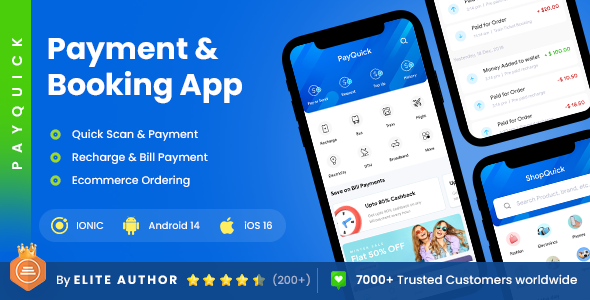
PayQuick 2 App Template provides a dual-interface mobile framework engineered for digital wallet operators, utility billers, and direct recharge services. This multi-application UI kit offers pre-built screens, balance display panels, and transaction history cards built for financial platforms. Developers can utilize these UI assets to assemble customer portals and administrator review dashboards across multiple transaction types. The component assets align to strict layout rules, keeping input fields and confirmation buttons readable on various mobile touchscreens.
Setting up PayQuick – 2 App Template | Online Bill Payment App allows platform administrators to configure transactional dashboards, wallet deposit fields, and multi-category service directories. The default screens feature high-contrast numeric keypads, toggle switches for payment options, and sliding confirmation banners to prevent accidental transfers. Users will find designated spacing for displaying current wallet balances, cashback incentives, and quick-pay shortcuts. These functional UI blocks are designed with pixel-perfect alignments to help developers assemble clear payment pathways without coding complex visual structures from scratch.
✅ Highlights & Value
Choosing a responsive 2 App Template helps developers quickly arrange separate client-facing screens and merchant-side options within a unified visual environment. Every layout component coordinates with native mobile blocks to maintain reliable container spacing and button alignments. This organization prevents display overlaps when displaying dense list views such as monthly electricity bills or mobile recharge histories. The structured styling options allow developers to modify colors, border styles, and container margins directly from the global variable files.
- Multi-Utility Directory Blocks: Pre-arranged grid sections that showcase categories like electricity, water, internet, and mobile network providers.
- Dynamic QR Code Scanner Screens: Features dedicated overlay frames designed for quick-scan wallet deposits and point-of-sale merchant payments.
- Clean Wallet History Grids: Offers organized list layouts that display transaction ID details, timestamp lists, and color-coded credit-debit statuses.
- Adaptive Numeric Input Fields: Includes optimized layout containers for phone number inputs, custom recharge values, and secure PIN entry screens.
✅ Real-World Use Cases
Deploying PayQuick – 2 App Template | Online Bill Payment App within active commercial setups streamlines how administrators monitor balance transfers, recharge triggers, and booking confirmations. The structured container blocks adjust seamlessly to fit various digital transaction systems, keeping customer interactions straightforward and predictable. This structural flexibility is highly beneficial when setting up distinct kinds of payment-centric mobile solutions.
- Local Bill Payment Gateways: Structuring multi-provider portals that allow local residents to verify outstanding utility bills and pay with saved cards.
- Mobile Network Recharge Hubs: Creating fast-action screens featuring auto-detect carrier logos, top-up denomination buttons, and immediate processing triggers.
- Event Ticket Booking Portals: Building step-by-step seat selectors, price tier tables, and barcode ticket generation templates within the layout.
- Peer-to-Peer Wallet Platforms: Setting up recipient phone number inputs, security PIN entry layouts, and final transaction status alert overlays.
✅ Technical & Compatibility
PayQuick includes pre-configured utility configurations designed to operate with standard backend APIs, ensuring that transactions process without interface stuttering. The underlying vector files are structured to render fast even when displaying multiple complex transaction charts or detailed lists on a single viewport. Developers can customize component dimensions, background colors, and list item spacing directly in the central design guidelines. This clean organization prevents component overlaps when third-party notification fields are active.
The application files maintain high standard alignments and modern responsive layouts across major mobile operating system viewport guidelines. The responsive container variables scale input margins and button sizes dynamically, keeping interactive areas easy to tap. Store administrators and app developers can use the pre-built screens to build additional payment menus, reducing the need for custom frontend programming. This standardized file structure prevents layout conflicts when updating backend communication protocols.
✅ FAQ & Tips
How do developers connect the layout components to active payment gateways? The templates provide standardized button and form placeholders that align with mainstream API integration inputs. These connection triggers reside inside the primary payment validation templates, ensuring that the interface transitions cleanly to confirmation pages once a payment completes successfully.
To ensure the best frontend speed on budget devices, we suggest keeping background graphics and illustration elements flat and lightweight. Placing dense transaction details in scrollable text matrices rather than full-screen animated panels also preserves memory. This design optimization keeps the checkout screen responsive, ensuring a quick transition when the play button is tapped.



There are no reviews yet.