
 My Account
✅ Product Overview
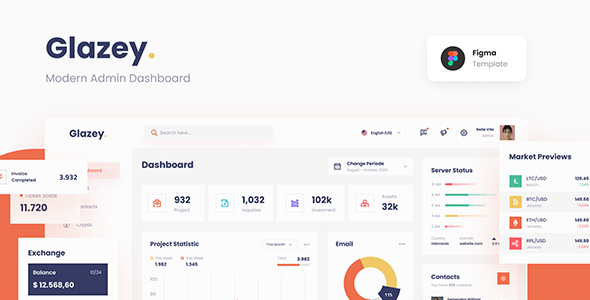
Glazey Professional Clean Modern Admin Dashboard Template Figma is a specialized vector design kit built for SaaS developers, web designers, and project managers. This UI asset package provides a set of highly editable interface layouts, data visualization widgets, and administrative control panels. Designers can utilize this template to establish clear structures for complex web apps, including custom statistics charts, user profiles, and transaction tables. The layout frames are organized within a structured canvas that simplifies the transition from wireframe prototypes to client presentations.
Utilizing Glazey – Professional Clean Modern Admin Dashboard Template Figma helps product owners establish consistent UI systems with reusable sidebars, chart modules, and form layouts. The templates emphasize clean grid alignments, neutral color choices, and clean navigation menus that keep developers focused on content organization. Users will find pre-built blocks designed to display active system metrics, user permissions tables, and message center previews. These standard elements are constructed with pixel-perfect margins to prevent alignment issues when converting layouts into live HTML frameworks.
✅ Highlights & Value
For design agencies, using a structured Professional Clean Modern Admin Dashboard Template Figma makes it easy to prototype data layouts and navigation bars. The visual components are structured with clean layers to allow quick customization of colors, borders, and rounded corners. Every template screen adapts to standard column grids, ensuring that custom data charts and user profiles retain clean visual spacing during modification. This system helps designers and developers coordinate interface choices without needing to discuss sizing rules repeatedly.
- Comprehensive UI Components: Includes pre-styled buttons, input fields, dropdown menus, and toggle switches built within standard auto-layout systems.
- Flexible Dark and Light Layouts: Offers dual color modes to ensure that interface elements remain readable under varying light environments.
- Organized Layer Hierarchy: Uses structured name structures for folders and components, making it simple to find specific chart or table assets.
- Adaptive Grid Structures: Follows a strict grid alignment layout to guarantee seamless translation from mockups to popular frontend frameworks.
✅ Real-World Use Cases
Deploying Glazey – Professional Clean Modern Admin Dashboard Template Figma in active production environments streamlines the transition from graphic mockup to front-end development. The interface blocks accommodate a wide variety of backend configurations, keeping the frontend structure organized and straightforward for users. This versatility is highly valuable when building diverse business application mockups.
- E-commerce Store Dashboards: Setting up structured sales graphs, inventory counts, and pending order tracking grids to manage merchant store performance.
- Project Management Portals: Creating detailed task lists, calendar components, and team allocation grids next to real-time deadline warnings.
- User Account Settings: Building secure profile menus, API key list containers, and payment method settings tables with clear checkmark highlights.
- Analytics Tracking Hubs: Implementing dense line charts, circular pie graphs, and geographic visitor statistics blocks in an easy-to-read grid system.
✅ Technical & Compatibility
Glazey features highly modular canvas components that work cleanly with native Figma features like Auto Layout, local styles, and variant systems. The source layout avoids complex grouping structures, allowing designers to duplicate specific dashboard frames and scale padding directly through simple drag operations. Every element utilizes clean vectors to ensure that layouts remain sharp even when scaled to ultra-wide desktop sizes or high-density mobile screens.
The underlying interface files maintain strict alignment with standard CSS frameworks and modular frontend structures. The typography definitions correspond to popular web font families, which ensures that live web pages match your static mockups exactly. Designers can export SVG icon layers and custom chart graphics in a single step without worrying about shape distortions or broken vector paths. This technical structure simplifies the process of integrating custom dashboard styles into active code projects.
✅ FAQ & Tips
How do I customize the default system colors across all screens? You can modify the global color styles within the primary panel, and the changes will update automatically across all active charts, tables, and buttons. This global adjustment behaves predictably, preventing layout inconsistencies when updating your design palette.
To ensure your developers can translate the mockup cleanly, we recommend organizing your components on dedicated local sheets. Exporting complex analytics tables as separate assets keeps the development handoff straightforward and prevents misunderstanding about UI spacing. Utilizing standard button heights and input spacing ensures a smooth transition to live code.



There are no reviews yet.