
 My Account
Product Description
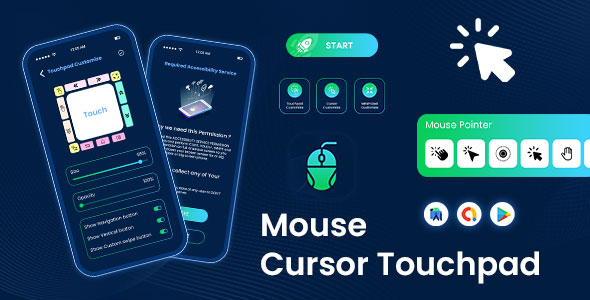
The Mouse Cursor Touchpad provides a complete app solution for a Quick Cursor – One-Handed Mode – Remote Mouse – Touchpad for Big Phone Tab, designed for developers looking to launch a high-demand utility application. This source code is the foundation for a powerful tool that dramatically improves the user experience on large-screen smartphones and tablets, a market segment that continues to dominate sales. By implementing an intuitive, reachable cursor, the Mouse Cursor Touchpad – Quick Cursor – One-Handed Mode – Remote Mouse – Touchpad for Big Phone Tab addresses the growing ergonomic challenges faced by modern mobile users. It’s an ideal project for developers targeting the accessibility and productivity niche in the app marketplace.
As phone screens continue to expand, reaching the top corners with just one thumb has become nearly impossible, leading to awkward hand gymnastics and potential strain. This application elegantly solves this by overlaying a small, manageable, and fully customizable touchpad at the bottom of the screen. Users can simply interact with this familiar trackpad-like area to control a precise cursor that can reach any part of the display. This makes every icon, button, and menu instantly accessible without needing to use a second hand or constantly shift their grip.
Key Features
- Intuitive One-Handed Mode: Easily reach the entire screen with a thumb-driven cursor.
- Customizable Trigger & Touchpad: Adjust the size, position, and appearance of the trigger area and touchpad to suit user preferences.
- Advanced Pointer Control: Fine-tune the cursor’s speed, acceleration, and visual style for a personalized experience.
- Versatile Swipe Gestures: Configure edge triggers with custom actions like navigating back, opening recent apps, or pulling down notifications.
- Remote Control Functionality: Use the app to control other Android devices, such as a smart TV or tablet, over a local network.
- Clean, Modern User Interface: Features a well-designed and easy-to-navigate interface, including a full dark mode.
- Ad Monetization Ready: Integrated with AdMob for immediate revenue generation opportunities.
- Comprehensive Documentation: Includes clear instructions for setup, customization, and deployment.
Use Cases
The primary application is for enhancing daily smartphone navigation, especially on devices with screens larger than six inches. With the Quick Cursor – One-Handed Mode – Remote Mouse – Touchpad for Big Phone Tab, users can effortlessly tap notifications, manage status bar icons, close apps, and interact with widgets at the top of their screen while holding their phone securely with one hand. This is incredibly useful during commutes, while multitasking with groceries, or for any individual with smaller hands who prefers larger devices for their display real estate.
Beyond single-device use, the remote mouse feature opens up new possibilities. Imagine a user controlling a presentation on a tablet from their phone without breaking their flow or seamlessly navigating an Android TV media center from the comfort of their couch. It transforms the phone into a powerful, portable input device, perfect for home entertainment systems or managing a secondary device without having to touch its screen directly. This consolidates device control and adds a layer of professional utility.
Benefits
For developers, the Mouse Cursor Touchpad source code represents a fast track to publishing a polished and highly marketable utility app. The code is clean, well-organized, and built with easy reskinning and customization in mind, significantly reducing typical development time and associated costs. By acquiring this package, you gain a solid and proven foundation to enter the lucrative accessibility tools market, with pre-integrated monetization and features that appeal to a broad audience experiencing a universal mobile usability issue.
End-users reap the rewards of a more comfortable, fluid, and efficient mobile experience. The system drastically reduces the finger and thumb fatigue often associated with stretching across large, vibrant displays. It promotes faster interaction by eliminating the need for grip adjustments, allowing for quicker access to controls and improving overall productivity in daily tasks. The intuitive nature of the touchpad and cursor means there is virtually no learning curve, making it an essential tool for anyone seeking to master their large-screen device.
Ultimately, this product is more than just a cursor; it’s a complete ergonomic enhancement designed for the modern age of mobile computing. The Mouse Cursor Touchpad – Quick Cursor – One-Handed Mode – Remote Mouse – Touchpad for Big Phone Tab offers a thoughtfully designed, feature-rich solution that bridges the gap between large, beautiful displays and practical, comfortable one-handed operation. It provides both a significant business opportunity for developers and a tangible quality-of-life improvement for mobile users everywhere.




There are no reviews yet.